
 Cell Editor for Google Sheets
The formula bar was never big enough.
Cell Editor opens the cell you are editing into a full editor inside Google Sheets. Colored syntax, live function hints, and nine checks that catch a broken formula before it reaches the sheet.
Free. Google Sheets in a desktop browser.
What Sheets gives you
What Cell Editor gives you
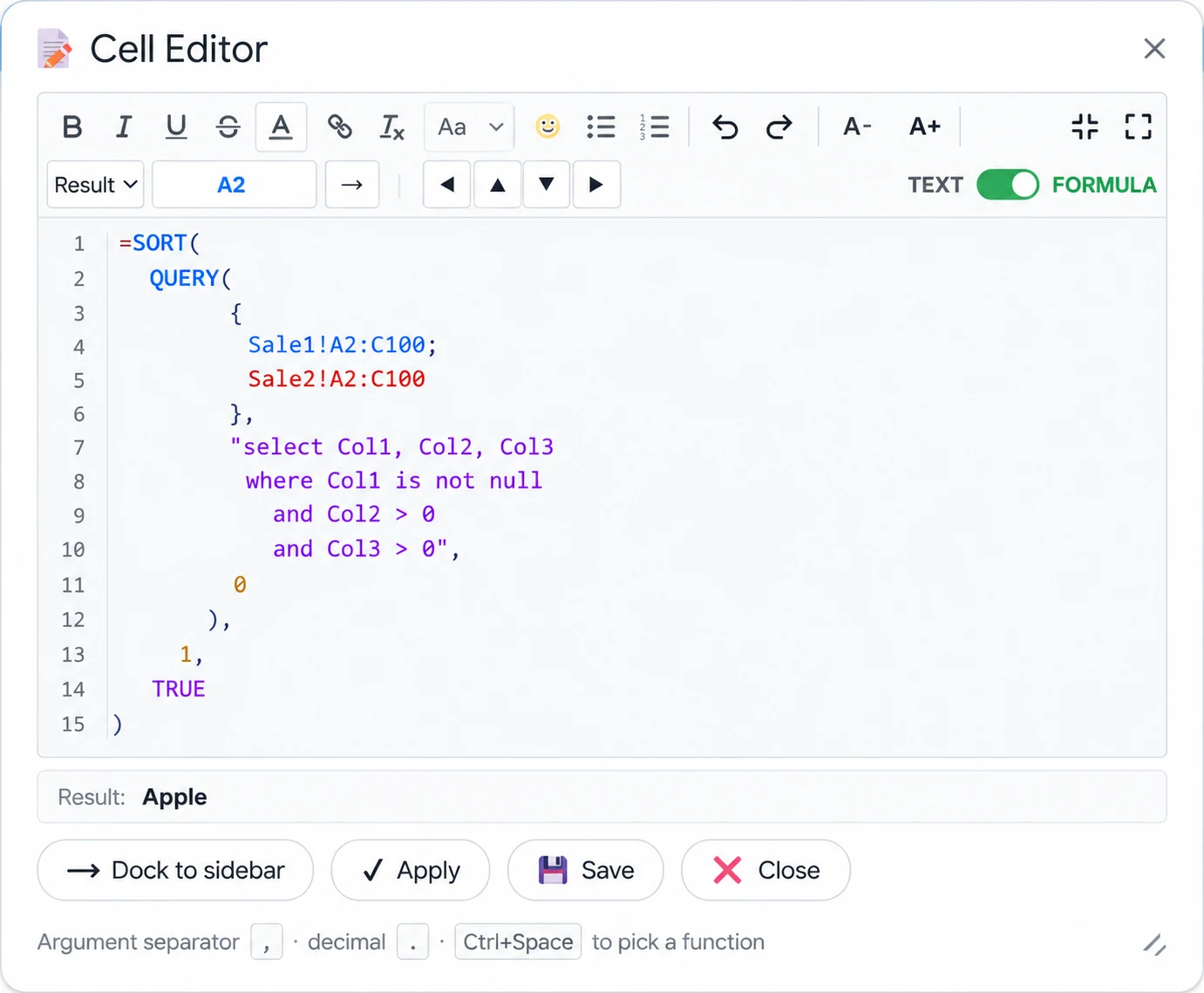
Everything the formula bar left out
One editor, two modes. Rich text for notes and descriptions, a code editor for formulas — each with its own tools.
Sidebar or window
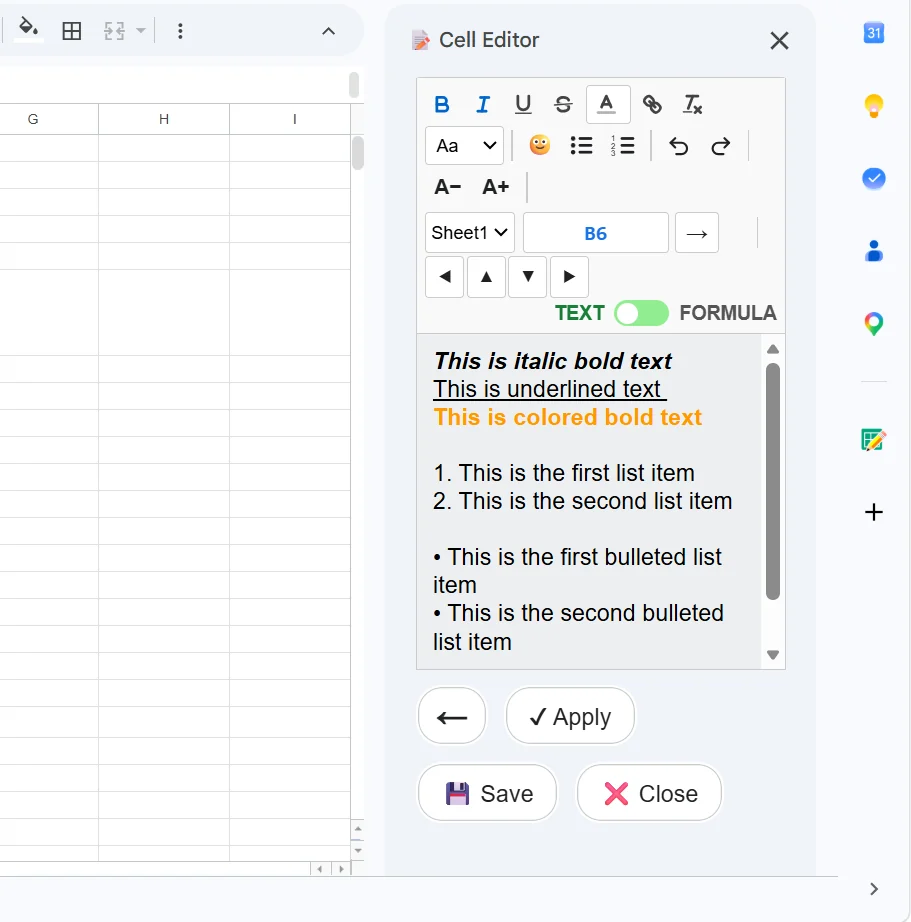
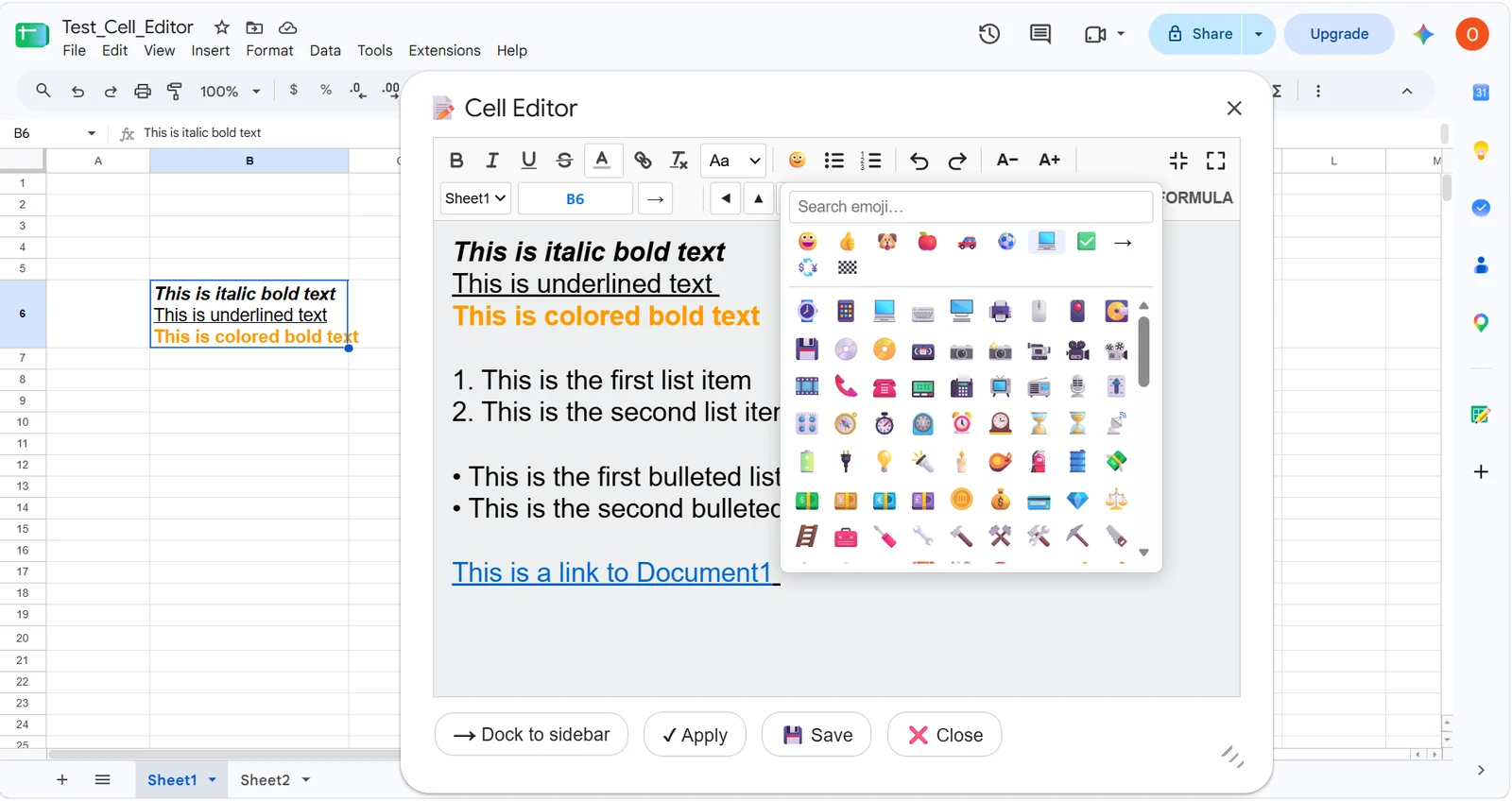
A narrow panel that stays beside the sheet, or a wide resizable window for long content. One button switches, and your choice is remembered.
Colored syntax
Functions, references, numbers, strings and brackets each take their own color, and every distinct reference gets its own shade.
Hints while you type
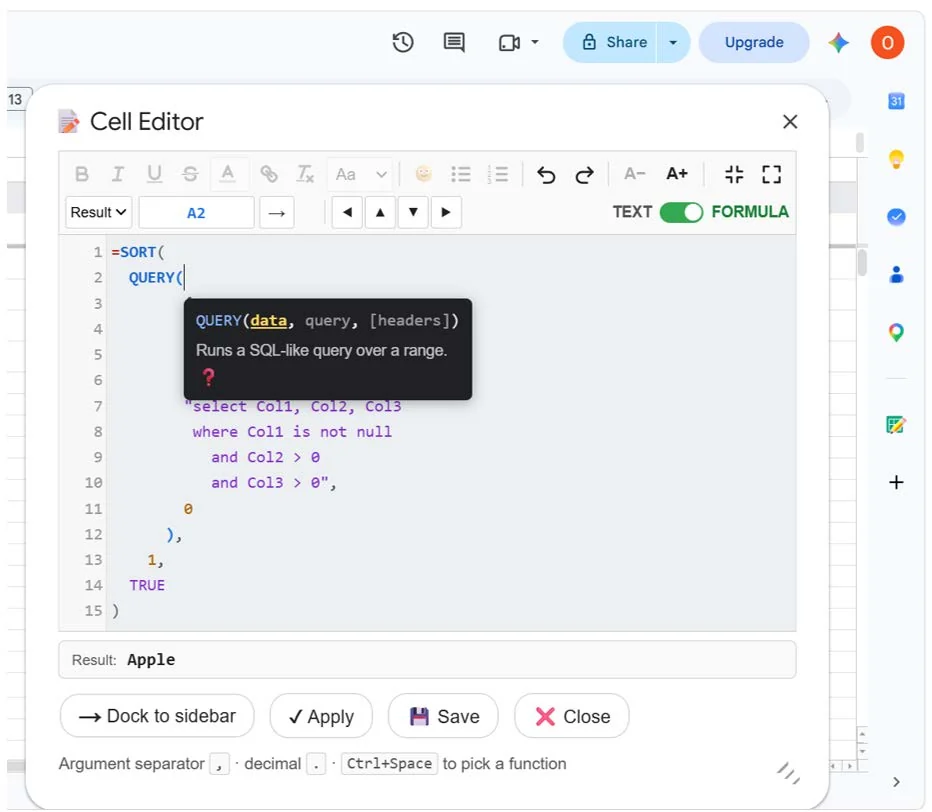
Open a bracket and the function signature appears with the current argument highlighted, described in your spreadsheet's language.
Pick ranges with the mouse
Put the cursor where the address belongs, select cells on the sheet, and the reference lands in the formula — cross-sheet names quoted correctly.
Move without closing
Step to the next cell with the arrow keys or type an address to jump, across sheets. Unsaved changes are flagged before you leave.
Scale the text
Enlarge the editor's font without changing the size of the characters in the cell itself. Built for long sessions and for low vision.
Rich text mode
Bold, italic, underline, strikethrough, color, point sizes, lists, several hyperlinks inside one cell, and an emoji picker with search.
Your locale decides
Argument and decimal separators follow your spreadsheet's own setting, and the pair in force is always shown at the bottom of the window.
Character counter
It appears as content nears the 50 000 character cell limit and turns red past it, blocking the save rather than truncating silently.
Formulas you can actually read
A nested QUERY inside a SORT is unreadable on one line. Broken across lines and colored by token, it is just a formula again.
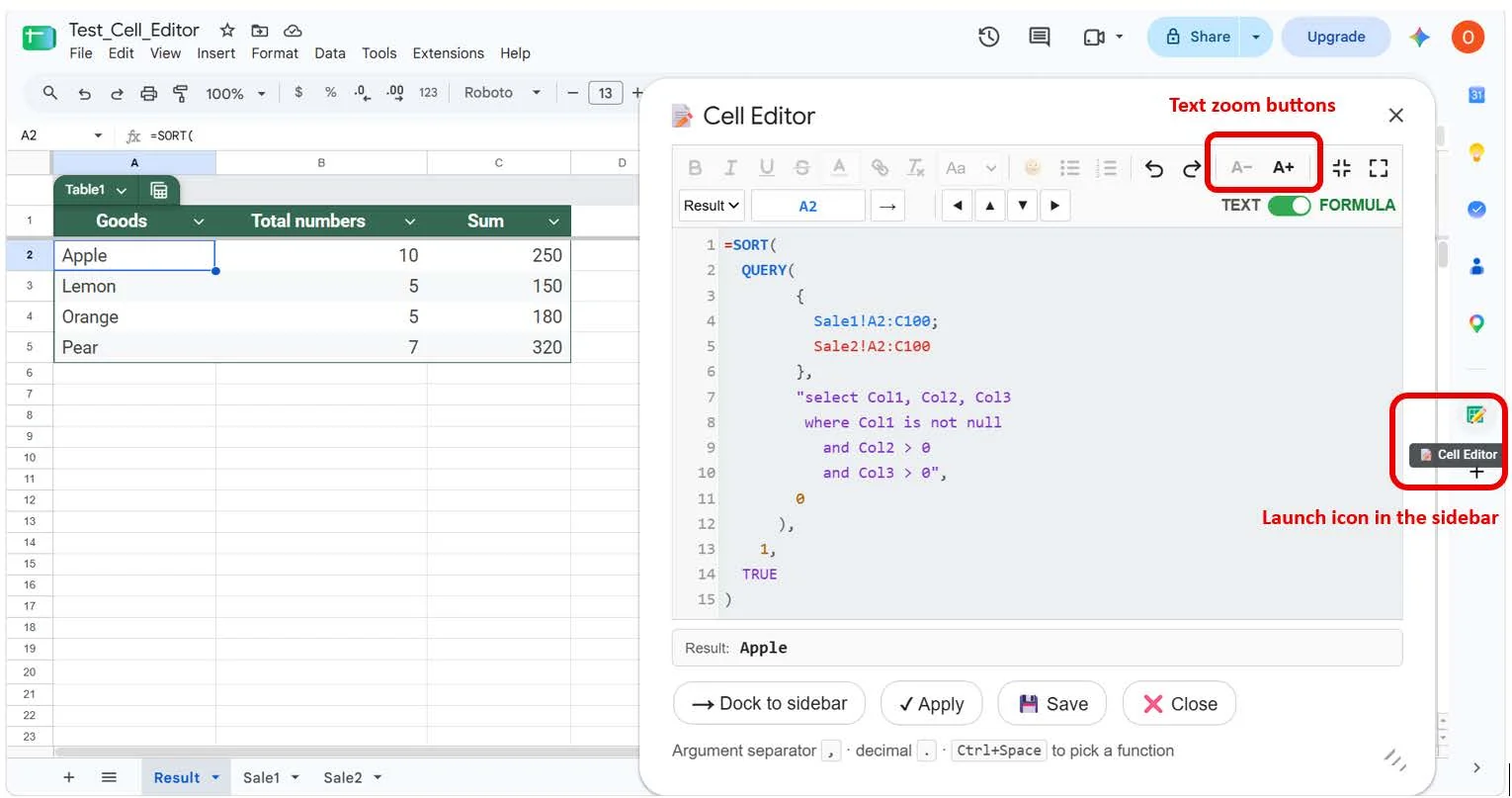
Every reference in its own shade
Two ranges from two different sheets take two different colors, so a repeated reference is obvious without reading character by character.
Room to break it up
Line numbers down the side and line breaks wherever you want them. Brackets and quotes are colored too, which is how a missing one becomes visible.
The answer, as you type
The result is recalculated and shown below the editor, and the separators in force are printed at the bottom of the window.
Five hundred and sixteen functions, recognized by name
Press Ctrl + Space to browse by category or start typing to match. Where a function has a described signature — 450 of them do — the hint shows it and links to Google's own reference page, opened in your language.
- Argument names stay in English, matching Google's documentation
- Sixteen categories, from statistical to the AI function
- Argument counts checked against the signature wherever one exists
Sixteen categories, 516 functions
The whole catalogue the editor recognises, used for autocompletion and for checking how many arguments you have passed. Open a category to see what is inside.
Statistical136
AVEDEVAVERAGEAVERAGE.WEIGHTEDAVERAGEAAVERAGEIFAVERAGEIFSBETA.DISTBETA.INVBETADISTBETAINVBINOM.DISTBINOM.INVBINOMDISTCHIDISTCHIINVCHISQ.DISTCHISQ.DIST.RTCHISQ.INVCHISQ.INV.RTCHISQ.TESTCHITESTCONFIDENCECONFIDENCE.NORMCONFIDENCE.TCORRELCOUNTCOUNTACOVARCOVARIANCE.PCOVARIANCE.SCRITBINOMDEVSQEXPON.DISTEXPONDISTF.DISTF.DIST.RTF.INVF.INV.RTF.TESTFDISTFINVFISHERFISHERINVFORECASTFORECAST.LINEARFTESTGAMMAGAMMA.DISTGAMMA.INVGAMMADISTGAMMAINVGAUSSGEOMEANHARMEANHYPGEOM.DISTHYPGEOMDISTINTERCEPTKURTLARGELOGINVLOGNORM.DISTLOGNORM.INVLOGNORMDISTMARGINOFERRORMAXMAXAMAXIFSMEDIANMINMINAMINIFSMODEMODE.MULTMODE.SNGLNEGBINOM.DISTNEGBINOMDISTNORM.DISTNORM.INVNORM.S.DISTNORM.S.INVNORMDISTNORMINVNORMSDISTNORMSINVPEARSONPERCENTILEPERCENTILE.EXCPERCENTILE.INCPERCENTRANKPERCENTRANK.EXCPERCENTRANK.INCPERMUTPERMUTATIONAPHIPOISSONPOISSON.DISTPROBQUARTILEQUARTILE.EXCQUARTILE.INCRANKRANK.AVGRANK.EQRSQSKEWSKEW.PSLOPESMALLSTANDARDIZESTDEVSTDEV.PSTDEV.SSTDEVASTDEVPSTDEVPASTEYXT.DISTT.DIST.2TT.DIST.RTT.INVT.INV.2TT.TESTTDISTTINVTRIMMEANTTESTVARVAR.PVAR.SVARAVARPVARPAWEIBULLWEIBULL.DISTZ.TESTZTESTMath83
ABSACOSACOSHACOTACOTHASINASINHATANATAN2ATANHBASECEILINGCEILING.MATHCEILING.PRECISECOMBINCOMBINACOSCOSHCOTCOTHCOUNTBLANKCOUNTIFCOUNTIFSCOUNTUNIQUECSCCSCHDECIMALDEGREESERFC.PRECISEEVENEXPFACTFACTDOUBLEFLOORFLOOR.MATHFLOOR.PRECISEGAMMALNGAMMALN.PRECISEGCDIMLNIMPOWERIMSQRTINTISEVENISO.CEILINGISODDLCMLNLOGLOG10MODMROUNDMULTINOMIALMUNITODDPIPOWERPRODUCTQUOTIENTRADIANSRANDRANDARRAYRANDBETWEENROUNDROUNDDOWNROUNDUPSECSECHSEQUENCESERIESSUMSIGNSINSINHSQRTSQRTPISUBTOTALSUMSUMIFSUMIFSSUMSQTANTANHTRUNCFinancial50
ACCRINTACCRINTMAMORLINCCOUPDAYBSCOUPDAYSCOUPDAYSNCCOUPNCDCOUPNUMCOUPPCDCUMIPMTCUMPRINCDBDDBDISCDOLLARDEDOLLARFRDURATIONEFFECTFVFVSCHEDULEINTRATEIPMTIRRISPMTMDURATIONMIRRNOMINALNPERNPVPDURATIONPMTPPMTPRICEPRICEDISCPRICEMATPVRATERECEIVEDRRISLNSYDTBILLEQTBILLPRICETBILLYIELDVDBXIRRXNPVYIELDYIELDDISCYIELDMATEngineering48
BIN2DECBIN2HEXBIN2OCTBITANDBITLSHIFTBITORBITRSHIFTBITXORCOMPLEXDEC2BINDEC2HEXDEC2OCTDELTAERFERF.PRECISEERFCGESTEPHEX2BINHEX2DECHEX2OCTIMABSIMAGINARYIMARGUMENTIMCONJUGATEIMCOSIMCOSHIMCOTIMCOTHIMCSCIMCSCHIMDIVIMEXPIMLOGIMLOG10IMLOG2IMPRODUCTIMREALIMSECIMSECHIMSINIMSINHIMSUBIMSUMIMTANIMTANHOCT2BINOCT2DECOCT2HEXText41
ARABICASCCHARCLEANCODECONCATENATEDOLLAREXACTFINDFINDBFIXEDJOINLEFTLEFTBLENLENBLOWERMIDMIDBPROPERREGEXEXTRACTREGEXMATCHREGEXREPLACEREPLACEREPLACEBREPTRIGHTRIGHTBROMANSEARCHSEARCHBSPLITSUBSTITUTETTEXTTEXTJOINTRIMUNICHARUNICODEUPPERVALUEArray30
ARRAY_CONSTRAINARRAYFORMULABYCOLBYROWCHOOSECOLSCHOOSEROWSFLATTENFREQUENCYGROWTHHSTACKLINESTLOGESTMAKEARRAYMAPMDETERMMINVERSEMMULTREDUCESCANSUMPRODUCTSUMX2MY2SUMX2PY2SUMXMY2TOCOLTOROWTRANSPOSETRENDVSTACKWRAPCOLSWRAPROWSDate26
DATEDATEDIFDATEVALUEDAYDAYSDAYS360EDATEEOMONTHEPOCHTODATEHOURISOWEEKNUMMINUTEMONTHNETWORKDAYSNETWORKDAYS.INTLNOWSECONDTIMETIMEVALUETODAYWEEKDAYWEEKNUMWORKDAYWORKDAY.INTLYEARYEARFRACInfo19
CELLERROR.TYPEISBLANKISDATEISEMAILISERRISERRORISFORMULAISLOGICALISNAISNONTEXTISNUMBERISREFISTEXTNNASHEETSHEETSTYPELookup17
ADDRESSCHOOSECOLUMNCOLUMNSFORMULATEXTGETPIVOTDATAHLOOKUPINDEXINDIRECTLOOKUPMATCHOFFSETROWROWSVLOOKUPXLOOKUPXMATCHOperator15
ADDCONCATDIVIDEEQGTGTELTLTEMINUSMULTIPLYNEPOWUMINUSUNARY_PERCENTUPLUSLogical14
ANDFALSEIFIFERRORIFNAIFSISBETWEENLAMBDALETNOTORSWITCHTRUEXORDatabase12
DAVERAGEDCOUNTDCOUNTADGETDMAXDMINDPRODUCTDSTDEVDSTDEVPDSUMDVARDVARPWeb8
ENCODEURLHYPERLINKIMPORTDATAIMPORTFEEDIMPORTHTMLIMPORTRANGEIMPORTXMLISURLGoogle7
AIDETECTLANGUAGEGOOGLEFINANCEGOOGLETRANSLATEIMAGEQUERYSPARKLINEParser6
CONVERTTO_DATETO_DOLLARSTO_PERCENTTO_PURE_NUMBERTO_TEXTFilter4
FILTERSORTSORTNUNIQUEWhat one cell can hold
Text mode is not decoration. These are four things a single cell can carry once you can format inside it — each one saving a column, a row, or a workaround.
One cell carries the state and the note together, so no extra column is needed for a colored dot.
- Export the monthly report
- Reconcile the totals against the ledger
- Send to the client and copy the account manager
A real numbered list inside one cell — the numbers come from the list, not typed in by hand, so inserting a step renumbers the rest.
Bold on one fragment, a link on another, and the rest plain — all within one cell.
Google Sheets attaches one link per cell on its own. Cell Editor attaches one per fragment.
Nine checks, two levels
Seven are errors and block the save. Two are warnings — they flag the formula and let you through.
- errorUnclosed quote in a text string
- errorUnclosed quote in a sheet name
- errorExtra closing bracket
- errorUnclosed bracket
- errorToo few arguments for the function
- errorToo many arguments for the function
- errorUnexpected character
- warningUnknown function name — likely a typo
- warningNesting too deep — split it across helper cells
=SUMIF(A2:A40, "paid, B2:B40)
Cells hold more than numbers
Switch to text mode for notes, descriptions and anything that needs formatting inside a single cell.
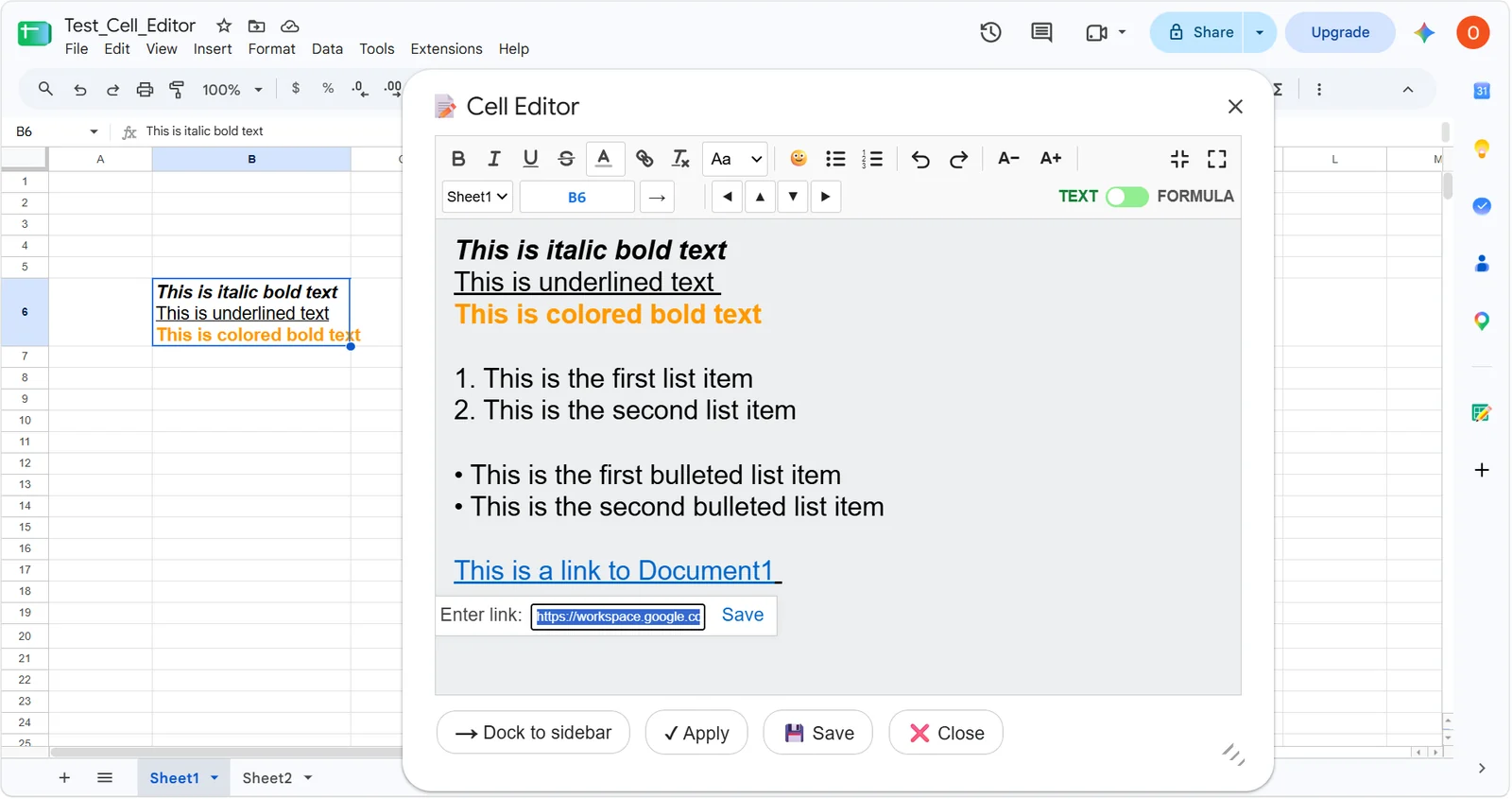
Formatting that survives the save
Bold, italic, underline and strikethrough, text color on individual fragments, and a point size that sets the real size of the characters in the cell. Lists come out as lists.
- Several hyperlinks attached to different fragments of one cell
- Clear formatting resets a fragment back to plain text
- Undo and redo inside the editor
Your spreadsheet stays yours. Cell Editor asks for exactly two permissions: to draw its window inside Google Sheets, and to work with the one spreadsheet you currently have open. It has no permission to reach the internet, so it cannot send your data anywhere even in principle. The privacy policy spells this out.
See it in the sheet
Both surfaces, both modes. Click any image to enlarge.
Twenty-five languages, chosen for you
The interface, the help and the function descriptions follow your spreadsheet's locale — the same setting that decides whether your separator is a comma or a semicolon. Function descriptions are translated into twenty of the twenty-five; the rest show them in English.
Questions people ask first
Short answers. Anything not here, write to support and it gets answered the same way.
Is Cell Editor really free?
Yes, and it stays free. There is no trial, no paid tier, no account to create and no card to enter. Install it from the Google Workspace Marketplace and use it on as many spreadsheets as you like.
Can the add-on see my other spreadsheets?
No. It asks for one permission over your documents, spreadsheets.currentonly, which covers only the file you have open at that moment. Your Drive, your other sheets, your email and your calendar are all outside what it can reach.
Is my data sent anywhere?
It cannot be. The add-on does not request script.external_request, the permission an Apps Script add-on needs before it can contact any server. Without it, Google itself blocks every outbound request. Your cell content is read and written inside your own browser and Google's runtime, and nowhere else.
Does it work in Excel or LibreOffice?
No. Cell Editor is built on Google Apps Script and runs only inside Google Sheets, in a desktop browser.
Does it work in Firefox?
The sidebar does, fully. The separate window opens in Firefox as a modal dialog, so it cannot be dragged and the sheet behind it cannot be clicked — which means picking ranges with the mouse is unavailable there. Chrome, Edge and Safari have no such restriction.
Can I put two different links in one cell?
Yes, and that is one thing Google Sheets will not do on its own. Select a fragment of text, attach a link to it, then select another fragment and attach a different one. Both survive the save.
Will it change how my formula is stored?
No. Line breaks and indentation you add in the editor are part of the formula text, exactly as they would be if you typed them in the formula bar. Google Sheets ignores them when calculating, so the result is identical — the formula is simply readable afterwards.
What happens to my text if it is too long?
A Google Sheets cell holds at most 50 000 characters. A counter appears as you approach that limit and turns red past it, and the editor refuses to save rather than cutting your text off silently.
Which languages does the interface use?
Twenty-five, chosen automatically from your spreadsheet's locale — the same setting that decides whether your argument separator is a comma or a semicolon. Function descriptions are translated into twenty of them; the rest show the descriptions in English.
How do I remove it?
Extensions menu, then Add-ons, then Manage add-ons, and remove Cell Editor. Your saved preferences go with it, and nothing of yours is left behind anywhere else, because nothing was ever stored outside your Google account.
Keyboard
On macOS, Cmd replaces Ctrl.
One thing to know about Firefox. There the separate window opens as a modal, so it cannot be dragged and the sheet is unreachable while it is open — which means picking ranges with the mouse does not work. Use the sidebar, or another browser, for range work.